BloggerOn
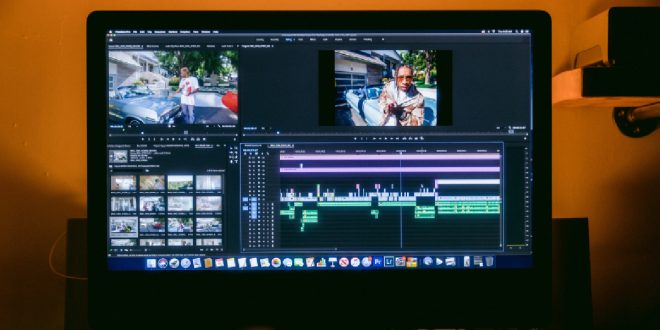
In today’s fast-moving digital world, visual storytelling has become more powerful than ever. Static images are no longer enough to capture attention—people want motion, emotion, and a narrative that unfolds before their eyes. This is where Image to Video technology steps in, transforming ordinary photos into dynamic, engaging videos that can tell stories, promote brands, and captivate audiences.
Whether you’re a beginner, a content creator, a marketer, or someone simply looking to preserve memories creatively, this guide will walk you through everything you need to know about turning images into videos in 2026.
What Is Image to Video?
At its core, Image to Video refers to the process of converting still images into a video format by adding motion effects, transitions, music, and sometimes even AI-generated animations.
Instead of a plain slideshow, modern tools use artificial intelligence to:
- Animate faces and objects
- Add camera-like movements (zoom, pan, tilt)
- Generate realistic motion from still images
- Sync visuals with music or voiceovers
This transforms static content into a compelling visual experience.
Why Image to Video Is So Popular in 2026
The rise of short-form video platforms and AI-powered tools has made video creation easier and more accessible than ever. Here’s why this format is booming:
1. Higher Engagement Rates
Videos consistently outperform images on platforms like Instagram, YouTube, and TikTok. Motion grabs attention instantly.
2. Easy Content Creation
You no longer need professional editing skills. AI tools can do most of the heavy lifting.
3. Cost-Effective Marketing
Businesses can create high-quality promotional videos without hiring expensive production teams.
4. Storytelling Power
Videos allow you to convey emotion, context, and narrative much better than static images.
Types of Image to Video Content
Before diving into tools and steps, it helps to understand the different types of videos you can create:
1. Slideshow Videos
A sequence of images with transitions and background music.
2. Animated Photo Videos
Photos are animated with motion effects like zooming or panning.
3. AI-Generated Motion Videos
AI tools add realistic movement—like blinking eyes or moving backgrounds.
4. Marketing Videos
Used for ads, product showcases, and brand storytelling.
5. Social Media Shorts
Short, engaging clips optimized for platforms like reels and shorts.
Tools You Can Use in 2026
There are plenty of tools available for beginners and professionals alike. Here are some popular categories:
Beginner-Friendly Tools
- Canva Video Editor
- CapCut
- InVideo
AI-Powered Tools
- Runway ML
- Pika Labs
- Kaiber AI
Professional Tools
- Adobe Premiere Pro
- After Effects
- Final Cut Pro
Each tool offers unique features, but most follow a similar workflow.
Step-by-Step Guide: How to Turn Photos into Videos
Let’s break down the process into simple steps.
Step 1: Choose Your Images Carefully
Your final video is only as good as your input images.
Tips:
- Use high-resolution images
- Maintain a consistent theme or color palette
- Arrange images in a logical sequence
For example, if you’re creating a travel video, organize images chronologically—from departure to return.
Step 2: Select the Right Tool
If you’re a beginner, start with a simple platform like Canva or CapCut. If you want advanced AI effects, explore tools like Runway or Pika.
Step 3: Upload Your Images
Most tools allow you to drag and drop images into a timeline. Once uploaded:
- Arrange them in order
- Adjust duration for each image (typically 2–5 seconds)
Step 4: Add Motion Effects
This is where the magic happens.
Common effects include:
- Zoom in/out (Ken Burns effect)
- Pan left/right
- Rotate slightly for dynamic feel
AI tools can even animate faces or simulate camera movements.
Step 5: Add Transitions
Transitions help your video flow smoothly.
Popular options:
- Fade
- Slide
- Zoom transitions
Avoid overusing flashy transitions—they can distract from your content.
Step 6: Include Music or Voiceover
Audio plays a huge role in engagement.
Options:
- Background music
- Narration
- Sound effects
Make sure your audio matches the mood of your video.
Step 7: Add Text and Captions
Text enhances storytelling and accessibility.
Use text for:
- Titles
- Subtitles
- Key messages
Keep it short, clear, and readable.
Step 8: Export Your Video
Once everything looks good:
- Choose resolution (1080p or 4K recommended)
- Select format (MP4 is most common)
- Export and download
Best Practices for Creating Engaging Videos
To stand out, you need more than just basic editing.
1. Keep It Short and Impactful
Attention spans are shrinking. Aim for 15–60 seconds for social media.
2. Use a Strong Opening
The first 3 seconds are critical. Start with a visually striking image.
3. Maintain Consistency
Use similar colors, fonts, and styles throughout your video.
4. Sync Visuals with Audio
Match transitions and cuts with beats in your music.
5. Focus on Storytelling
Even a simple video should have:
- Beginning
- Middle
- End
Use Cases of Image to Video
This technique is incredibly versatile.
For Content Creators
- Instagram reels
- YouTube shorts
- Portfolio videos
For Businesses
- Product promotions
- Brand storytelling
- Customer testimonials
For Personal Use
- Wedding slideshows
- Travel memories
- Birthday videos
Common Mistakes to Avoid
Even beginners can create great videos by avoiding these pitfalls:
1. Overloading with Effects
Too many animations can make your video look messy.
2. Poor Image Quality
Low-resolution images reduce overall video quality.
3. Ignoring Audio
Silent or poorly chosen audio reduces engagement.
4. Lack of Structure
Random images without a narrative feel confusing.
How AI Is Changing Image to Video Creation
In 2026, AI has revolutionized how videos are made.
Key Innovations:
1. Motion Generation
AI can animate still images realistically.
2. Scene Expansion
It can extend backgrounds beyond the original image.
3. Lip Sync and Voice AI
Images can be turned into talking avatars.
4. Automated Editing
AI selects transitions, music, and timing automatically.
These advancements make Image to Video tools more powerful and beginner-friendly than ever before.
SEO Benefits of Using Videos
If you run a website or blog, adding videos can boost your SEO.
Benefits:
- Increased time on page
- Lower bounce rate
- Better user engagement
Search engines favor multimedia content, especially videos.
Monetization Opportunities
You can also earn money using this skill.
Ways to Monetize:
- Freelance video editing
- Selling social media content
- Creating YouTube videos
- Offering marketing services
With minimal investment, this skill can turn into a profitable side hustle.
Future Trends in Image to Video
Looking ahead, here’s what we can expect:
1. Hyper-Realistic AI Videos
Photos will be turned into near-real cinematic clips.
2. Real-Time Video Creation
Instant video generation from a single image.
3. Voice-Controlled Editing
Create videos using voice commands.
4. AR/VR Integration
Videos will become immersive experiences.
FAQs
Is Image to Video suitable for beginners?
Yes, many tools are designed specifically for beginners with drag-and-drop features.
Do I need expensive software?
No. Free and affordable tools can produce high-quality videos.
How long does it take to create a video?
A simple video can be created in 10–30 minutes.
Can I use my phone?
Yes, most tools have mobile apps for easy editing.
What format should I export?
MP4 is widely supported and recommended.
Final Thoughts
The ability to transform static images into engaging videos is no longer limited to professionals. With the rise of AI and user-friendly tools, anyone can create stunning visual content in minutes.
Whether you’re looking to grow your social media presence, promote a business, or simply bring your memories to life, mastering Image to Video techniques is a valuable skill in 2026.
Start simple, experiment with different styles, and gradually refine your approach. The more you practice, the better your videos will become—and the more impact they’ll have.