 BloggerOn
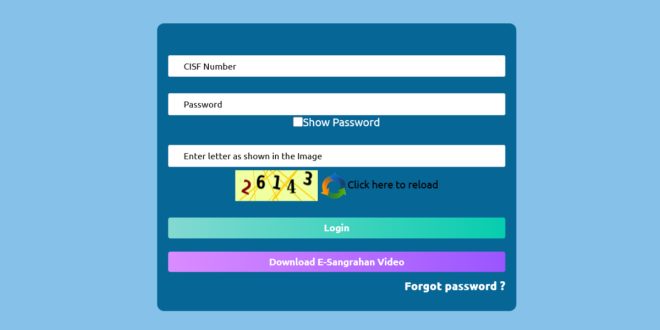
If you are an employee of the Central Industrial Security Force (CISF), managing your official information, pay slips, leave records, and other employment-related activities online has become easier than ever. The CISF Employee Corner Login portal is a dedicated platform designed to provide employees with easy access to all necessary services in one secure location.
In this blog, we will cover everything you need to know about the CISF Employee Corner Login, including step-by-step login procedures, features, benefits, troubleshooting tips, and frequently asked questions. Whether you are a new recruit or a seasoned officer, this guide will ensure you are well-prepared before signing into the portal.
What is CISF Employee Corner?
The CISF Employee Corner is an official online portal specifically created for employees of the Central Industrial Security Force. It acts as a central hub where employees can access personal and professional information, including:
-
Pay slips and salary details
-
Leave and attendance records
-
Official circulars and notifications
-
Training and promotion information
This portal is part of the government’s initiative to digitize employee management, making it convenient, secure, and efficient for all personnel.
Key Features of CISF Employee Corner Login
The CISF Employee Corner Login portal offers multiple features that enhance employee convenience and transparency. Some of the primary features include:
| Feature | Description | Benefit |
|---|---|---|
| Payslip Access | View and download monthly payslips | Track salary history and deductions easily |
| Leave Management | Apply for leave and track leave balance | Quick approval process and accurate leave records |
| Training Updates | Access training schedules and certifications | Stay updated on professional development |
| Official Notifications | Receive circulars, instructions, and notices | Ensure timely awareness of organizational updates |
| Profile Management | Update personal and contact details | Maintain accurate employee records |
These features make the portal a one-stop solution for all CISF employee needs, saving time and minimizing administrative hassles.
Why Use the CISF Employee Corner Login?
Using the CISF Employee Corner Login portal offers multiple advantages for employees. Some of the key benefits include:
-
Time-Saving – Employees can access all official information online without visiting offices physically.
-
Transparency – Salary, leave, and promotion details are readily available, ensuring clarity.
-
Security – The portal uses secure login methods to protect sensitive employee data.
-
Easy Communication – Official circulars and notifications are delivered instantly.
-
24/7 Access – Employees can access their data anytime from anywhere.
By leveraging this portal, CISF ensures that its employees can manage their professional life efficiently, with minimal administrative delays.
Step-by-Step Guide to CISF Employee Corner Login
Accessing your account on the CISF Employee Corner portal is straightforward. Follow the steps below carefully to log in successfully:
Step 1: Visit the Official Portal
Open your web browser and go to the official CISF Employee Corner website. Make sure you use a secure connection (https://) to protect your data.
Step 2: Locate the Login Section
On the homepage, you will find the Login section labeled “CISF Employee Corner Login.” Click on it to proceed.
Step 3: Enter Your Credentials
You will need your official Employee ID and Password. Make sure you enter the correct details to avoid login issues.
Step 4: Complete CAPTCHA Verification
Some sessions may require CAPTCHA verification to confirm that you are not a bot. Enter the displayed characters accurately.
Step 5: Click on Login
After entering the required details, click the Login button. You will be redirected to your dashboard, where you can access all services.
Step 6: Explore Your Dashboard
Once logged in, take a moment to explore the dashboard. Check your payslips, leave balances, notifications, and other services available.
Common Issues During CISF Employee Corner Login
Even though the portal is user-friendly, some employees may face issues during login. Here are common problems and solutions:
| Issue | Possible Cause | Solution |
|---|---|---|
| Forgotten Password | Incorrect credentials | Use the “Forgot Password” option to reset your password |
| Account Locked | Multiple unsuccessful login attempts | Contact the IT or HR department to unlock your account |
| Unable to Access Portal | Browser compatibility or server issues | Clear cache, use updated browser, or try later |
| Incorrect Employee ID | Typographical errors | Verify your Employee ID with HR records |
Being aware of these common issues can help you resolve login problems efficiently without unnecessary delays.
Tips for a Smooth Login Experience
To ensure that you have a smooth experience on the CISF Employee Corner Login portal, follow these tips:
-
Use Updated Browsers – Browsers like Google Chrome, Mozilla Firefox, or Microsoft Edge work best.
-
Check Internet Connection – A stable connection prevents disruptions during login.
-
Avoid Shared Devices – Login from personal or official devices to maintain security.
-
Keep Credentials Safe – Never share your Employee ID or password.
-
Update Contact Information – Ensure your email and phone number are up-to-date for recovery options.
Following these simple precautions can save you time and prevent potential login issues.
How to Recover Your CISF Employee Corner Password
If you forget your password, you can reset it quickly using the following steps:
-
Click the Forgot Password link on the login page.
-
Enter your Employee ID and registered email address.
-
Check your email for a password reset link.
-
Follow the instructions to create a new password.
-
Log in using the new credentials.
Pro Tip: Choose a strong, unique password and update it periodically for security purposes.
CISF Employee Corner Dashboard Overview
After a successful login, you will be directed to your personalized dashboard. Here’s a breakdown of what you can typically find:
| Section | Purpose |
|---|---|
| Profile Information | Displays your personal and contact details |
| Pay & Salary | Access payslips, salary statements, and tax deductions |
| Leave Management | View leave balance, apply for leave, track approvals |
| Training & Development | Check scheduled training and completed programs |
| Notifications | Access circulars, updates, and announcements |
Understanding the dashboard layout helps you navigate the portal effectively, making it easier to manage your official tasks.
Benefits of Digitizing Employee Services
The CISF Employee Corner represents a shift toward digital governance, offering numerous benefits:
-
Efficiency – Reduces paperwork and manual intervention.
-
Accessibility – Employees can access information anytime and anywhere.
-
Accuracy – Minimizes errors in salary, leave, and training records.
-
Transparency – Encourages a more open and accountable system.
This digitization aligns with modern HR practices and government digital initiatives.
Security Measures on CISF Employee Corner Login
Security is a top priority for the CISF portal. Employees can be assured that their data is protected through multiple measures:
-
Secure HTTPS Connection – All data is encrypted during transmission.
-
Strong Password Protocols – Passwords must meet complexity requirements.
-
Limited Access – Only authorized personnel can access sensitive data.
-
Regular Audits – The portal undergoes periodic security reviews to prevent breaches.
Following best practices like not sharing your credentials and logging out after use enhances the portal’s security further.
CISF Employee Corner Login for Mobile Devices
The portal is optimized for mobile devices, allowing employees to access their accounts on smartphones and tablets. Mobile access ensures that you can:
-
Check payslips on the go
-
Apply for leave remotely
-
Stay updated with notifications
Using a mobile-friendly browser or the official mobile portal version ensures a smooth experience.
FAQs About CISF Employee Corner Login
Here are some frequently asked questions to help you better understand the portal:
Who can access the CISF Employee Corner?
All active employees of CISF, including officers and staff, are eligible to use the portal.
Can I change my password on the portal?
Yes, you can change your password from the profile settings once logged in.
What should I do if I forget my Employee ID?
Contact the HR department to retrieve your Employee ID.
Is the portal secure for accessing salary information?
Yes, the portal uses encryption and strong security measures to protect employee data.
Can I access my leave records on the portal?
Absolutely. The leave management section provides detailed information on your leave balance and history.
Who should I contact for login issues?
For technical problems, reach out to the IT support team or your HR department.
Conclusion
The CISF Employee Corner Login portal is a revolutionary tool for employees, providing a secure, transparent, and convenient platform to manage official information. By following the step-by-step login guide and familiarizing yourself with the portal’s features, you can maximize its benefits and simplify your professional life.
Whether you need to check payslips, apply for leave, or stay updated with official notifications, the CISF Employee Corner is your go-to platform.
Pro Tip: Always keep your login credentials secure, update your personal information regularly, and explore the dashboard to make the most of the portal.
With this guide, you are now fully prepared to navigate the CISF Employee Corner with confidence and efficiency.




2 comments
Pingback: fluconazole 100 mg
Pingback: prevacid tablets over the counter