BloggerOn
In the digital age, random number generation isn’t just for computer scientists and statisticians—it’s for everyone. Whether you’re playing a game, making decisions, choosing winners for a giveaway, or even trying to simulate luck in your daily life, random number generators (RNGs) are increasingly becoming handy tools. Among the easiest and most accessible options is the Google Random Number Generator, which is free, fast, and built into the world’s most popular search engine.
In this blog, we’ll explore the Google Random Number Generator in depth—how it works, practical applications, fun tricks, and smart hacks to help you make the most of it.
What Is the Google Random Number Generator?
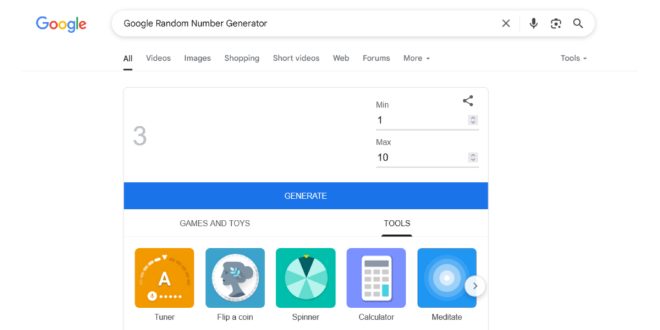
The Google Random Number Generator is a simple tool built directly into the Google search engine. When you type phrases like “random number generator” or “pick a number between 1 and 100” into Google’s search bar, the RNG tool pops up instantly at the top of your results page.
It allows you to:
-
Set a minimum and maximum number
-
Generate random integers instantly
-
Regenerate numbers with a click
It’s completely free and does not require any app or sign-in. Google’s RNG is part of a broader set of utilities like coin flips, dice rolls, timers, and calculators.
How to Access and Use It
Here’s a quick guide to start using the Google RNG in seconds:
Step-by-Step:
-
Open your web browser.
-
Go to www.google.com.
-
Type:
-
“Random number generator”
-
Or “Pick a number from 1 to 10”
-
-
Press Enter.
-
You’ll see the Google Random Number Generator appear at the top.
Interface Features:
-
Min and Max: You can enter custom ranges like 1 to 6 for a dice roll, or 1 to 1000 for a lottery.
-
Generate Button: Produces a new random number on every click.
-
Instant Output: It shows the number in bold without any delay.
You don’t need any technical know-how—this tool is designed for anyone to use, even kids!
How Does It Work?
The Google Random Number Generator relies on a pseudo-random algorithm. While it’s not purely random in a cryptographic sense, it’s more than sufficient for everyday use.
How Random Is It?
-
It uses algorithms that simulate randomness.
-
For most non-secure tasks (like games, lists, draws), it’s perfectly reliable.
-
It’s not recommended for encryption or security-based applications.
Behind the scenes, Google likely uses standard random functions in its backend (possibly JavaScript-based) to generate values, ensuring a fair distribution within your defined range.
Practical Everyday Uses
The Google Random Number Generator isn’t just a gimmick—it can streamline your daily decisions and tasks.
Examples:
-
Dinner Choices: Assign cuisines numbers from 1 to 5, and let the RNG decide.
-
Workout Routines: Use it to randomize sets, reps, or exercise types.
-
Chore Charts: Number each household task, then pick one randomly.
-
Reading List: Let it choose the next book or article to read.
-
Music Selection: Assign albums or playlists to numbers and shuffle using RNG.
The beauty lies in its flexibility and ease of use.
Creative and Fun Use Cases
Sometimes we need to add a spark of randomness to life. That’s where fun hacks come into play.
Fun Ideas:
-
Truth or Dare Selector: Create a numbered list of dares and use RNG to pick one.
-
Lucky Draws: Run giveaways by assigning participant numbers and letting RNG pick the winner.
-
Board Games: Simulate dice rolls if you lose your actual dice.
-
Name Picker: Number your players or students, then generate a number to choose someone randomly.
These ideas are great for parties, classrooms, and team-building activities.
Classroom and Educational Use
Teachers and educators can use the Google Random Number Generator in many engaging ways:
Educational Hacks:
-
Pop Quizzes: Randomize questions using number lists.
-
Student Participation: Number students and randomly call one to answer.
-
Math Games: Teach probability or statistics through live RNG examples.
-
Spelling Bees: Randomly select spelling words by index.
Because it’s accessible on mobile and desktop, educators can use it in online and in-person classrooms alike.
Decision-Making Hacks
Have trouble making decisions? Let Google RNG choose for you!
Life Hacks:
-
Clothing Choices: Can’t decide what to wear? Assign outfits numbers.
-
TV Shows/Movies: Let RNG pick your next binge.
-
Travel Plans: Narrow down to 3-5 destinations, and spin the wheel of randomness.
-
Pet Names: Choosing a new dog’s name from a list? RNG helps keep it unbiased.
This is a great way to reduce decision fatigue while keeping the process fun.
Gamification and Contest Ideas
Turn boring tasks into exciting mini-games using the Google Random Number Generator.
Examples:
-
Fitness Challenges: Randomize squats, jumping jacks, or rest times.
-
Writing Prompts: Assign prompts numbers and let RNG choose.
-
Giveaways: Use it to draw lucky winners for online or offline contests.
-
Quiz Competitions: Randomize the order of questions for each player.
Gamification can make productivity, learning, or wellness more enjoyable.
Advanced Tips and Workarounds
Though the Google RNG is simple, you can extend its functionality with creative thinking.
Tricks and Hacks:
-
Simulate Dice Rolls: Set range 1–6, 1–20 (D20), or 2–12 (for dual-dice).
-
Color Generator: Number colors, and let RNG decide your outfit theme.
-
Time Blocks: Randomly assign activities to time slots in your day.
-
Playlist Shuffle: Number songs in a playlist and play them according to RNG.
-
RNG Spinner Alternative: If you need a visual spin wheel, Google “wheel spinner” or try online tools that pair well with RNG.
You can even combine Google Sheets or Excel with RNG logic for batch randomizations.
Google RNG vs. Other RNG Tools
There are several random number generators available online. Here’s how Google compares:
| Feature | Google RNG | Third-Party RNG Tools |
|---|---|---|
| Ease of Access | ✅ Instant via Google | ❌ Needs URL or app |
| Free to Use | ✅ 100% free | ✅ Mostly free |
| Custom Ranges | ✅ Yes | ✅ Yes |
| Extra Features (e.g. pick names) | ❌ Limited | ✅ Often available |
| Visual Appeal | ❌ Basic UI | ✅ Rich visuals possible |
| Ads/Distractions | ❌ None | ❌ Sometimes present |
For most users, Google’s tool is ideal for speed and simplicity.
Limitations and Precautions
The Google Random Number Generator is awesome, but it’s important to know its boundaries:
What It Can’t Do:
-
No batch generation (can’t generate multiple numbers at once)
-
No saving or exporting of results
-
Not suitable for cryptographic or secure applications
-
No historical tracking of previous results
-
No customizable features like excluding past values
Precaution Tips:
-
Use spreadsheets or scripts if you need multiple draws
-
Use third-party RNGs for more advanced features
-
Avoid using it for critical or legally binding decisions
Despite these limitations, it remains a highly useful everyday utility.
Final Thoughts
The Google Random Number Generator might seem like a basic tool, but it opens up a world of possibilities. From simplifying your life’s small decisions to enhancing your classroom or gamifying your day-to-day routine, the RNG provides surprising versatility.
Whether you’re a student, teacher, gamer, professional, or just someone who wants to make decision-making a little more fun, the Google Random Number Generator is at your fingertips—literally a Google search away.
Key Takeaways:
-
It’s fast, free, and built right into Google.
-
You can use it for games, decisions, contests, classroom activities, and more.
-
With a little creativity, the basic RNG becomes a powerful productivity and engagement tool.
So next time you’re indecisive, uninspired, or just looking to mix things up—Google it! Let randomness bring a little spontaneity to your structured life.